OctoPane: every client’s Microsoft 365 tenant in one console
OctoPane runs users, MFA, licenses, Conditional Access and security posture for every client tenant. Without signing in to a single portal, and without GDAP.

OctoPane runs users, MFA, licenses, Conditional Access and security posture for every client tenant. Without signing in to a single portal, and without GDAP.
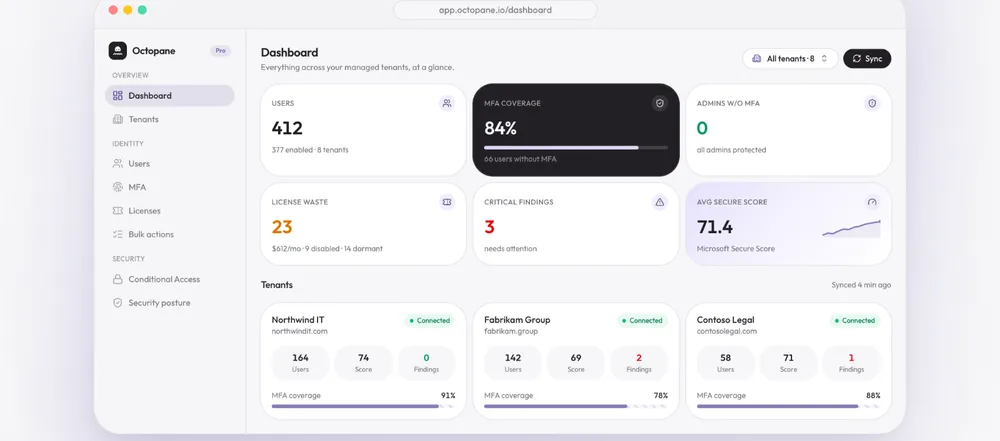
Every user across all your tenants, with their registration state and actual MFA methods, even without Entra ID P1.
Seats on disabled or 90-day dormant accounts, priced at list price or your negotiated rates. OctoPane also reads 90 days of app usage to suggest a cheaper license, user by user.
A coverage matrix shows which Conditional Access policies are missing at which client. Your baseline policies deploy in one click wherever they are missing.
Password resets, session revocation, enabling or disabling accounts, MFA enforcement. Each action reports a result per item and stays on record in the audit log.
OctoPane’s own checks next to Microsoft Secure Score, with Microsoft’s recommended actions ranked by the points they are worth.
Every client domain is graded on SPF, DKIM, DMARC, MX and MTA-STS. Microsoft 365 incidents and Message Center items from every tenant land in one place.
Entra, Exchange, Intune, Defender, the admin center: multiplied by every client, that is dozens of portals. A technician spends the first hour of an incident just signing in to the right tenant.
Meanwhile, licenses on disabled accounts keep being billed and dormant users go unnoticed. Security drift, a missing MFA method or an absent Conditional Access policy, moves in its own direction in every tenant, and nothing shows the tenants side by side.
Lighthouse assumes CSP partner status and GDAP relationships with every client. CIPP needs GDAP and infrastructure to host. OctoPane is SaaS and only needs one consent link per client, whether or not you resell their licenses.
It also adds what those tools do not price: wasted Microsoft 365 licenses in dollars, and seats to move down a tier based on real app usage. For an MSP, Microsoft 365 license management becomes a list of names and amounts instead of a yearly audit.
OctoPane covers Microsoft 365 and Entra ID, and nothing else: it does not read your RMM, your EDR or the state of your devices. It stores no passwords, needs no shared Global Admin account and never reads email or file content.
To see device coverage, EDR, RMM and backup, across all your clients, see Volgap for MSPs, our other software for MSPs.
OctoPane is built by Techmood. Our consultants manage Microsoft 365 every day as part of our digital workplace expertise, and they built the tool they wanted to follow several tenants without juggling portals. They use it, and they can help you harden your tenants.
OctoPane is free for up to 2 tenants, with no time limit. Pro costs $39 a month for up to 25 tenants, Business $99 a month for unlimited tenants, and Enterprise is priced on quote. Paid plans start with a 14-day trial: a card is required, and nothing is charged before day 15.
Features, the detailed comparison and signup are on octopane.io. Our other products are on the Techmood software page. A question? Get in touch.
Every feature, integration and the trial are on the official OctoPane website.
Go to octopane.ioNo. OctoPane is a multi-tenant Entra ID application. You send your client an admin consent link, a Global Admin approves it once, and the tenant syncs within minutes. Access goes through app-only Microsoft Graph, with no stored passwords, and the client can revoke it from their own Entra portal. OctoPane keeps directory metadata only, encrypted on AWS, and never reads mailbox or file content.
Microsoft Graph, for Microsoft 365 and Entra ID. Your clients do not need Entra ID P1: where Microsoft gates data behind P1, such as sign-in activity, OctoPane uses per-user authentication methods and Microsoft 365 usage reports instead. The Business plan adds an MCP server, so you can query OctoPane from any compatible AI.
MSPs managing several client tenants, and large support teams. It works for any tenant, whether or not you resell its Microsoft 365 licenses. The free plan covers 2 tenants with no time limit, and paid plans start with a 14-day trial.
OctoPane is built by Techmood. It grew out of our consultants’ assignments, managing Microsoft 365 for clients and wanting a single console to do it. They use it, and they can help you put in place the good practices it brings to light.